
Creating an Organization
Step-by-step flow for creating an organization in Revenue Recovery
Creating an Organization
Introduction
Organizations serve as the fundamental workspace structure in Revenue Recovery, representing individual healthcare facilities or operational units. Each organization maintains its own dedicated EHR system connection, isolated data environment, and administrative controls.
Creating an organization establishes the foundation for claim data synchronization, user access management, and revenue recovery operations within your facility's scope.
Prerequisites
Before creating an organization, ensure you have:
- Administrator permissions in Revenue Recovery
- EHR system credentials from your IT department
- Network connectivity verified between EHR and Revenue Recovery systems
- Approved vendor (currently NextGen, with additional vendors coming soon)
Step-by-Step Creation Flow
The organization creation process follows a structured three-step workflow that guides administrators through establishing their workspace and EHR connection configuration.
Accessing the Creation Workflow
- Navigate to EHR Connection: From the main dashboard, select EHR Connection from the left navigation panel
- Initiate Creation: Click the "Create Organization" button to launch the setup workflow
Step 1: Create Organization Details
The first step focuses on defining your organization's basic information and operational parameters.
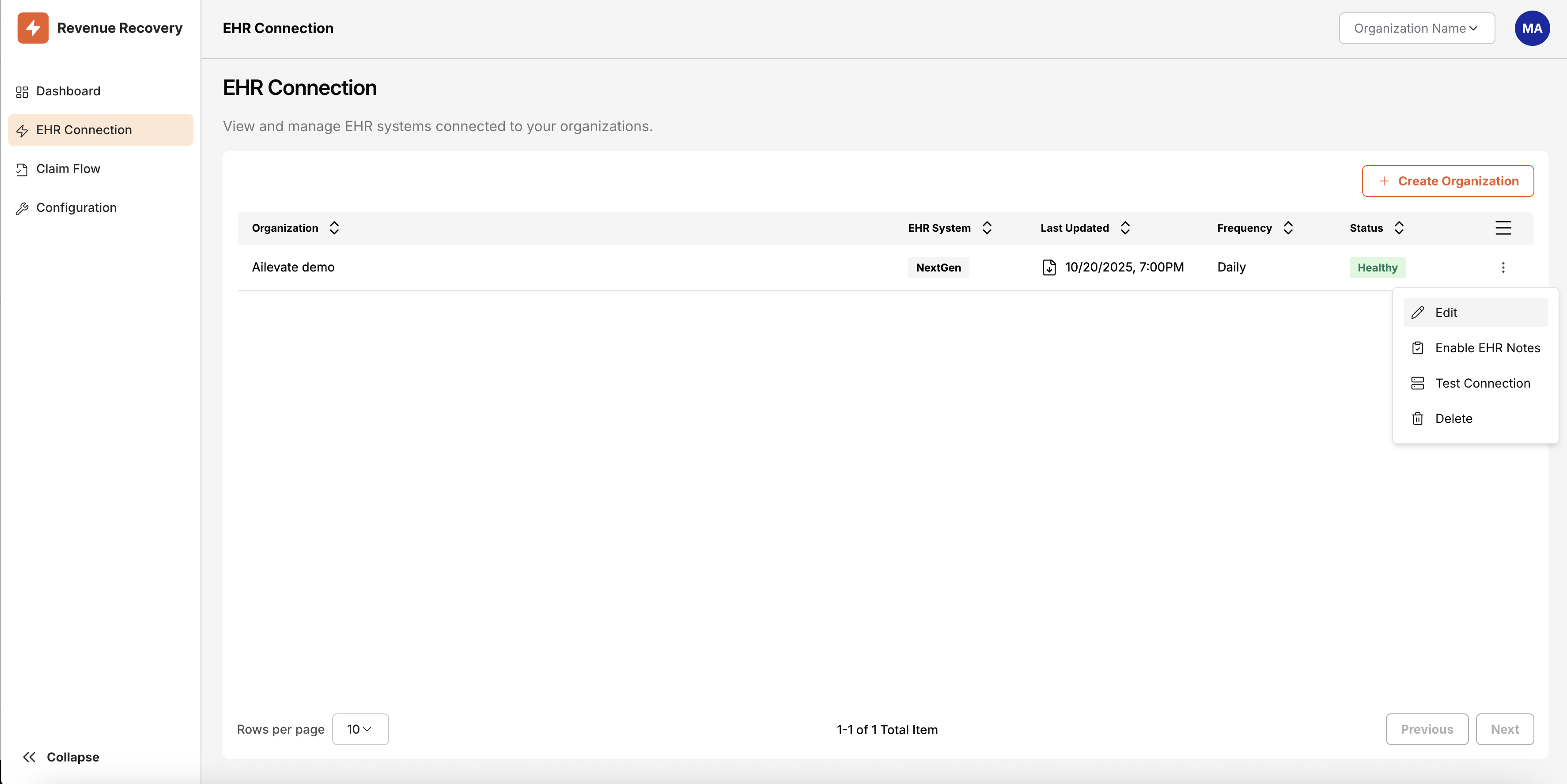
Complete the following fields:
- Organization Name: Enter the official name of your healthcare facility or department
- Description: Provide a brief description of the organization's purpose and scope
- Transfer Frequency: Select how often claim data should be synchronized from your EHR system
- Start Time: Choose the preferred time for data transfer operations to begin
- Assign or Create Admins: Designate administrative users who will manage the organization
- EHR System Vendor: Select your Electronic Health Record system provider
Next Action: Click "Next" to proceed to EHR system configuration
Step 2: Connect to EHR System
The second step configures the technical connection parameters specific to your EHR vendor and system environment. The configuration options presented will adapt based on the EHR System Vendor selected in Step 1.
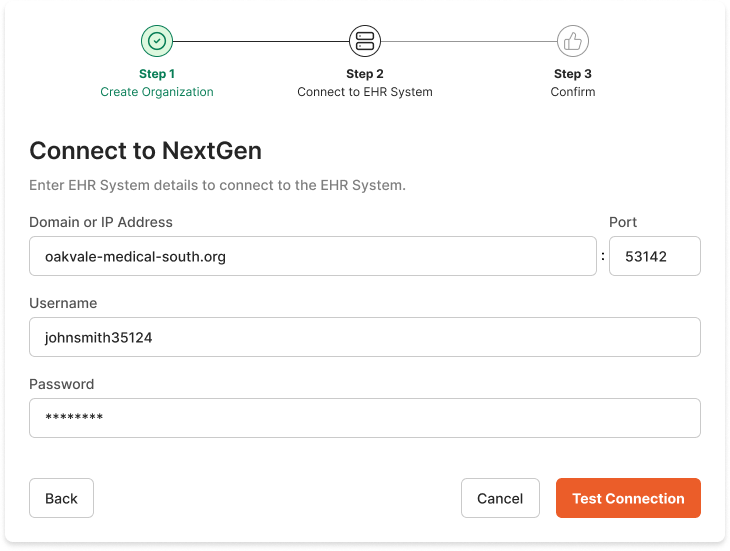
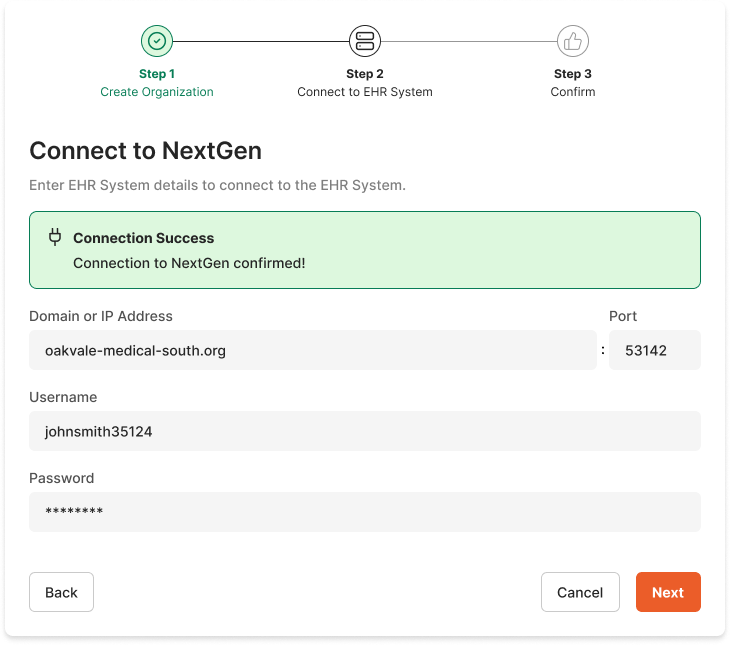
Configuration includes:
- Connection endpoints and server details
- Authentication credentials (username and password)
- Database to connect and source claim data and health records from
- Test connectivity validation to ensure proper communication
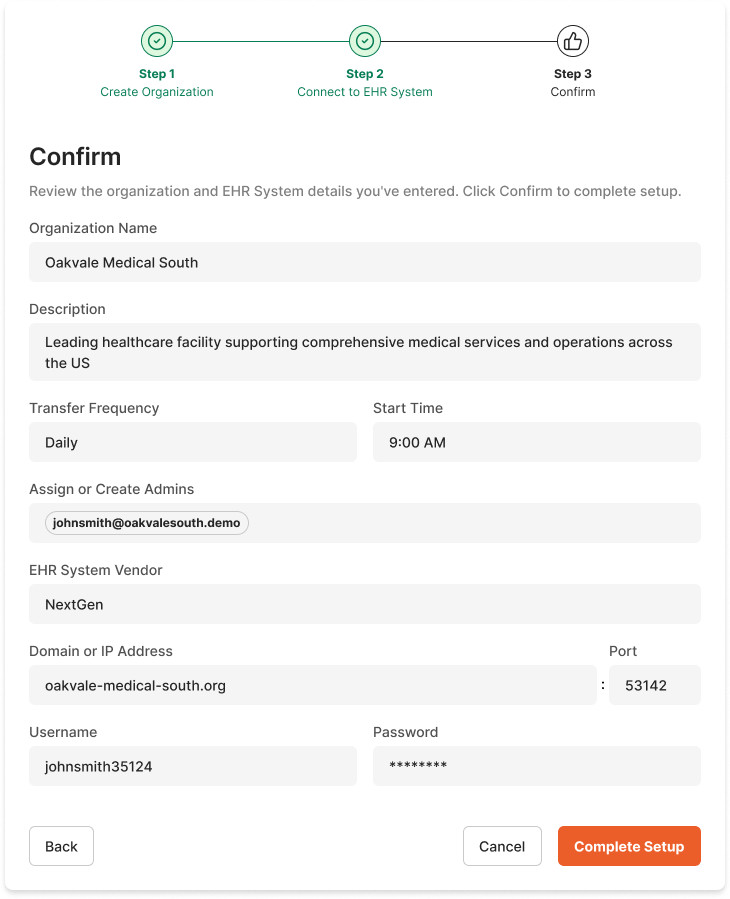
Step 3: Confirm and Finalize
The final step presents a comprehensive review of all configuration details before establishing the organization and activating the EHR connection.
Review includes:
- Organization details and administrative assignments
- EHR connection parameters and data transfer settings
- Confirmation of all required fields and validations
Completion: Click "Create Organization" to finalize setup and begin claim data synchronization
Required Fields for Organization Creation
Understanding each required field ensures accurate organization setup and optimal system performance from the initial connection.
Organization Name (Required)
Definition: The official name identifier for your healthcare facility, department, or operational unit
Purpose: Creates the primary label used throughout the platform for data organization and user interface display
Best Practice: Use consistent naming conventions that align with your organization's official records
Description (Optional)
Definition: A descriptive summary of the organization's scope, purpose, or operational focus
Purpose: Provides contextual information for administrators managing multiple organizations
Best Practice: Include facility type, location, or specialty information for easy identification
Transfer Frequency (Required)
Definition: The schedule interval for synchronizing claim data from your EHR system to Revenue Recovery
Available Options:
- Hourly: Continuous near real-time synchronization for high-volume facilities
- Recommended for: Large hospitals processing 500+ claims daily, facilities with urgent denial resolution requirements
- Considerations: Higher system resource usage, requires robust network connectivity
- Every 12 hours: Twice-daily updates balancing currency with system resource usage
- Recommended for: Medium-sized facilities processing 100-500 claims daily, most healthcare organizations seeking optimal balance
- Considerations: Good balance of data freshness and system performance, suitable for standard business operations
- Daily: Once-daily synchronization suitable for smaller facilities or specific operational workflows
- Recommended for: Small practices processing fewer than 100 claims daily, facilities with batch-oriented workflows
- Considerations: Minimal system impact, sufficient for facilities with less time-sensitive denial management
Selection Guidelines:
- High-Volume Facilities (500+ daily claims): Choose Hourly for immediate denial identification and faster revenue recovery
- Standard Facilities (100-500 daily claims): Choose Every 12 hours for optimal balance of performance and data currency
- Small Practices (< 100 daily claims): Choose Daily to minimize system overhead while maintaining effective denial management
- Network Constraints: Consider lower frequencies if experiencing bandwidth limitations or EHR performance issues
Purpose: Balances data currency requirements with system performance and resource utilization based on your facility's operational needs and technical constraints
Start Time (Required)
Definition: The preferred time of day when data transfer operations should commence
Purpose: Allows organizations to schedule transfers during optimal periods, avoiding peak operational hours or system maintenance windows
Considerations: Select times that minimize impact on EHR system performance and align with operational workflows
Assign or Create Admins (Required)
Definition: Designation of users who will have administrative privileges for the organization
Purpose: Establishes access control and management responsibilities for the organization's configuration and operations
Requirements: At least one administrator must be assigned to ensure ongoing management capabilities
EHR System Vendor (Required)
Definition: Selection of your Electronic Health Record system provider from supported vendors
Current Support: NextGen (with additional vendors planned for future releases)
Purpose: Determines the specific connection protocols, data formats, and integration parameters used for claim data synchronization
How Organizations are Linked to EHR
Organizations establish dedicated one-to-one relationships with EHR systems, creating secure and isolated data environments that respect healthcare facility boundaries and operational requirements.
Connection Configuration
Dedicated Integration: Each organization maintains its own specific EHR system connection, ensuring that claim data remains segregated and secure according to facility boundaries. This architecture prevents data commingling between different healthcare entities while supporting independent operational requirements.
Vendor-Specific Configuration: The EHR System Vendor selection drives the technical implementation of the connection, with each vendor requiring specific authentication methods, data formats, and communication protocols. Revenue Recovery adapts its integration approach based on the selected vendor to ensure optimal compatibility and performance.
Security & Compliance: All EHR connections use encrypted channels and comply with HIPAA requirements. For details, see Compliance & Legal.
Data Partitioning and Access Control
Organizational Boundaries: All claim data imported from the EHR system is automatically associated with the specific organization, creating clear data boundaries that align with healthcare facility structure and compliance requirements.
Administrative Scope: Organization administrators have full management access to their facility's data, configuration settings, and user permissions, while remaining isolated from other organizations within the same Revenue Recovery instance.
Multi-Organization Support: While the current MVP version focuses on single-organization deployments, the platform architecture supports expansion to multi-organization environments for healthcare networks and larger health systems in future releases.
Operational Integration
Organizations control how their EHR data flows into Revenue Recovery through the Transfer Frequency and Start Time settings, enabling each facility to optimize synchronization based on their operational requirements and system constraints.
For detailed information about navigating between organizations and understanding organizational data filtering, see the Organizations documentation in the Navigation and UI Basics section.
Troubleshooting
Common challenges and solutions for organization creation and initial EHR connection setup.
Organization Creation Issues
| Problem | Solution |
|---|---|
| "Organization Name already exists" error | Organization names must be unique within your Revenue Recovery instance. Try adding location identifiers, department codes, or facility numbers to create distinction (e.g., "Metro General Hospital - East Campus"). |
| Unable to assign administrators during creation | Ensure the user accounts exist in your system before attempting assignment. If creating new admin users, complete their account setup first, then return to organization creation. |
| EHR System Vendor not listed | Contact your Revenue Recovery support team to discuss integration options for unlisted EHR vendors. Current MVP support focuses on NextGen with additional vendors planned for future releases. |
EHR Connection Validation
| Problem | Solution |
|---|---|
| Connection test fails during Step 2 | Verify that: • EHR system credentials are correct and active • Network connectivity allows outbound connections from EHR system • Firewall settings permit communication on required ports • EHR system is accessible and not in maintenance mode |
| Transfer frequency settings cause system performance issues | Consider adjusting to a lower frequency (e.g., from Hourly to Every 12 hours) if experiencing: • EHR system performance degradation during transfers • Network bandwidth constraints • Large data volumes causing extended transfer times |
Post-Creation Verification
| Problem | Solution |
|---|---|
| Organization created but no claim data appears | Allow 24-48 hours for initial data synchronization to complete. If data remains unavailable: • Verify EHR connection status in the EHR Connection dashboard • Check transfer frequency settings align with expected data availability • Confirm EHR system contains denied claims data for the configured date range |
| Cannot access organization after creation | Ensure your user account has been properly assigned administrative privileges for the organization. Contact the user who created the organization to verify admin assignments if access issues persist. |
Next Steps
Congratulations! Your organization is now configured and connected to your EHR system.
Within 24-48 hours, you'll see your first denied claims data appear in the dashboard. While you wait:
- Explore the Dashboard: Learn how to interpret denial insights in Dashboard & Insights
- Understand the Claims Workflow: Preview how you'll work with denials in Working with Denied Claims
Need help? Contact your Revenue Recovery support team or check the Troubleshooting section above.
Updated 12 months ago