
Navigation and UI Basics
Help users understand where to find data and health insights so they can confidently operate the platform
Revenue Recovery offers several ways to help users efficiently access claim data, filter information, and navigate between different functional areas.
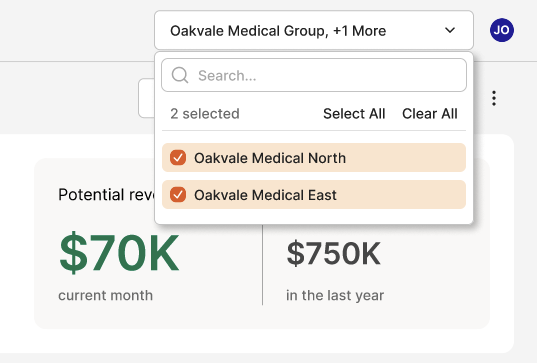
Organization Selector
The Organization Selector enables users to filter their view to specific healthcare organizations within their network. This is particularly valuable for healthcare systems managing multiple facilities, clinics, or provider groups, allowing focused analysis of claim data for individual organizational units.
Date Selector
The Date Selector works in conjunction with the Organization Selector to provide precise temporal filtering across all dashboard views and reports. Users can focus on specific time ranges to analyze trends, compare performance periods, or investigate particular timeframes of interest. Select from predefined periods (Last Month, Last Quarter) or custom date ranges.
Main Navigation
The main navigation provides access to Revenue Recovery's core functional areas through a persistent sidebar menu. Each section is designed to support specific workflows within the revenue cycle management process.
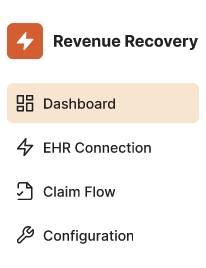
Dashboard - Central command center displaying key metrics, performance indicators, and actionable insights across your revenue recovery operations.
EHR Connection - Manage Organizations and monitor connections to Electronic Health Record systems, ensuring secure data integration and real-time claim information synchronization.
Claim Flow - Access detailed claim information, track denial patterns, review recommendations, and manage the claim resolution process from identification through recovery.
Configuration - Administrative controls for system setup, user management, authentication settings, and organizational preferences.
Configuration
The Configuration section provides comprehensive administrative controls organized into logical groupings for efficient system management:
Authentication Management
- Status - Monitor authentication system health and active integrations
- Microsoft - Configure Microsoft EntraID/Azure AD single sign-on integration
- Magic Link - Set up passwordless email-based authentication
- Security Settings - Manage trusted IP ranges and domains, and other security parameters
User Management
- Accounts - Create, edit, and manage user accounts across organizations
- Roles - Define and assign user roles with appropriate permission levels (Admin, Contributor, User)
Breadcrumbs
Revenue Recovery implements breadcrumb navigation throughout the application to provide clear context and enable efficient navigation between related pages. Breadcrumbs appear in the top navigation bar and show the hierarchical path from the main section down to the current page.
For example, when viewing authentication settings, breadcrumbs display: Configuration > Status, clearly indicating both the main section and the specific subsection.
Updated 12 months ago