
Standard Charges
How to view, add, and manage standard charges within a contract and across all contracts.
Standard charges are the individual service codes and their contracted rates that make up a payer contract. Ailevate uses these charges to validate claim payments and identify underpayments.
All Standard Charges View
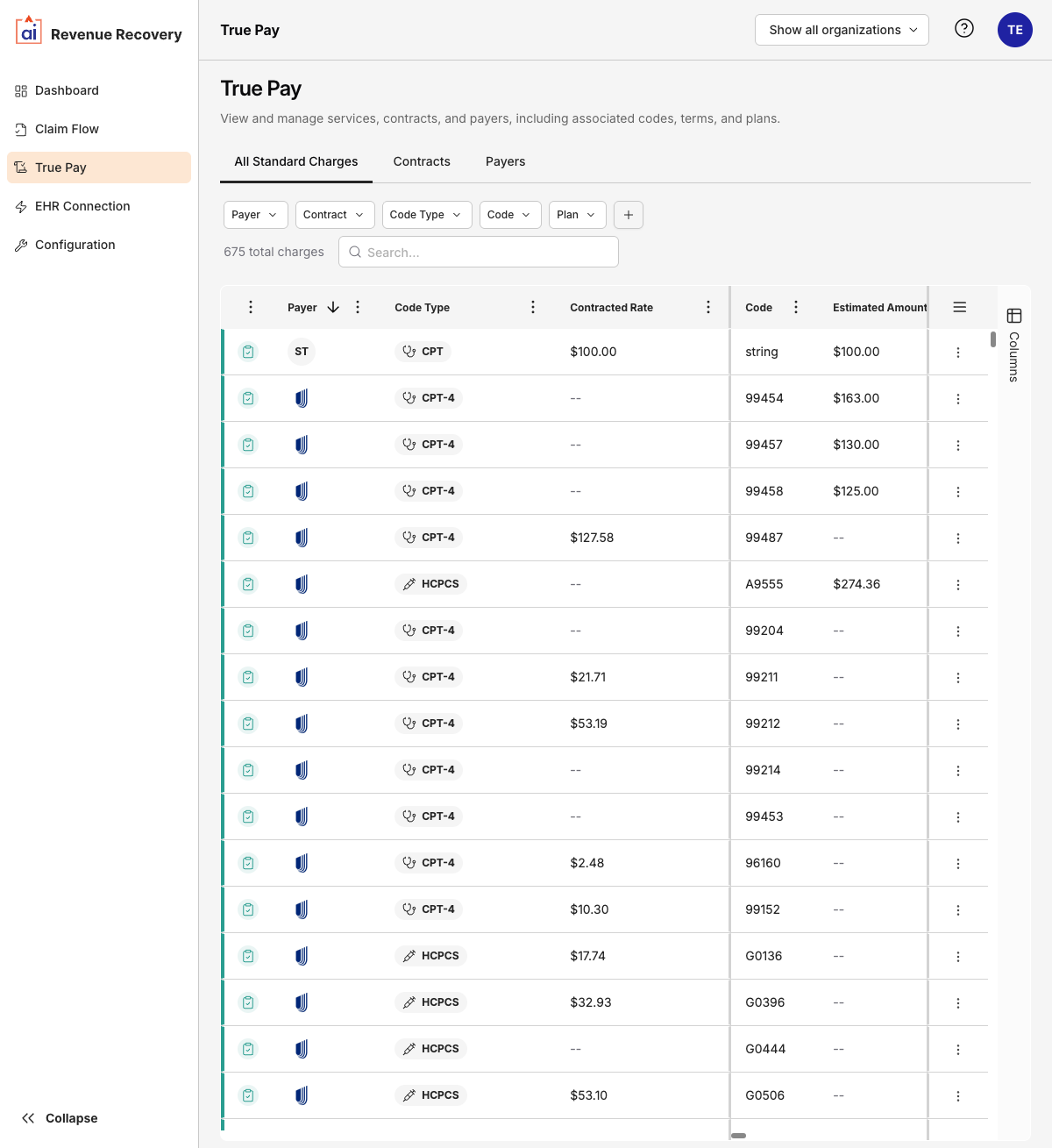
The All Standard Charges tab on the main TruePay page shows a unified view of every charge across all contracts. This is useful for auditing and cross-contract comparisons.
| Column | Description |
|---|---|
| Methodology | The reimbursement method (Case Rate, Fee Schedule, Percent of Total Billed Charges, Per Diem, or Other) |
| Payer | The payer this charge belongs to |
| Code Type | The coding system used (e.g. CPT, CPT-4, HCPCS) |
| Contracted Rate | The agreed reimbursement amount |
| Code | The specific procedure or service code |
| Estimated Amount | The expected reimbursement |
| Plan | The plan type this rate applies to (PPO, HMO, EPO, or POS) |
| Description | A human-readable description of the service |
Filters: Payer, Contract, Code Type, Code, Plan.
Clicking a charge row opens a detail drawer showing the charge's code, type, and payer. From the drawer's More Options (⋮) menu you can: Go to Contract, Share, Edit, or Delete the charge.
Contract-Level Standard Charges
Within a contract's detail view, the Standard Charges tab shows only the charges for that contract. Filters available here: Code Type, Code, Plan.
Clicking a charge row opens a detail drawer. From the drawer's More Options menu you can: Share, Edit, Duplicate, or Delete the charge.
Adding a Charge Manually
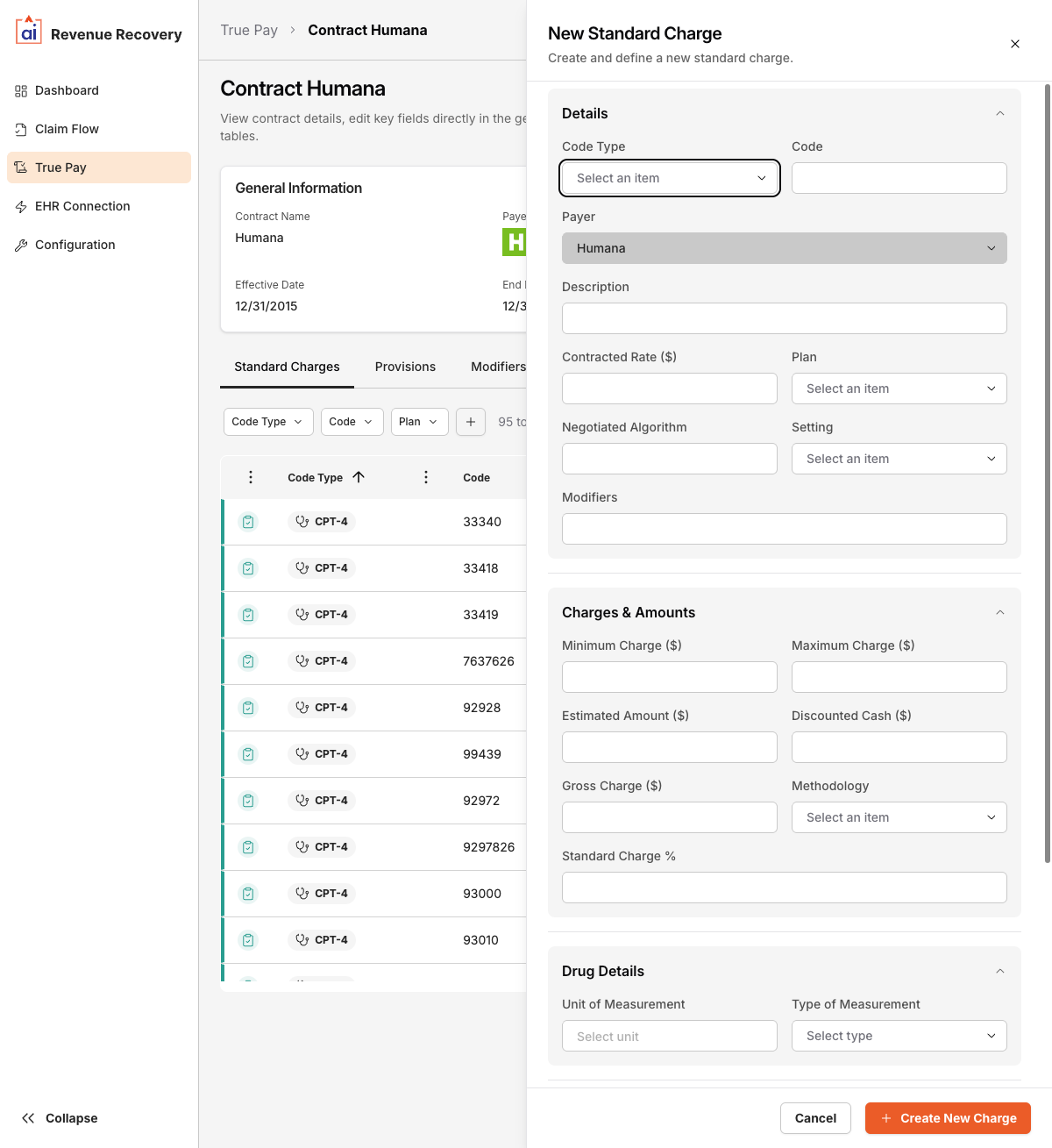
Click + Add Charge to open the New Standard Charge form. The form has four sections:
Details
| Field | Notes |
|---|---|
| Code Type | Required. Select from the supported code types (see below) |
| Code | The procedure or service code |
| Payer | Pre-filled from the contract — not editable |
| Description | Human-readable service description |
| Contracted Rate ($) | The negotiated reimbursement dollar amount |
| Plan | The plan type: PPO, HMO, EPO, or POS |
| Negotiated Algorithm | Optional algorithm or formula for rate calculation |
| Setting | The care setting (e.g. inpatient, outpatient) |
| Modifiers | Any applicable billing modifiers |
Charges & Amounts
| Field | Notes |
|---|---|
| Minimum Charge ($) | Floor for this charge |
| Maximum Charge ($) | Ceiling for this charge |
| Estimated Amount ($) | Expected reimbursement |
| Discounted Cash ($) | Cash-pay discounted rate |
| Gross Charge ($) | Full undiscounted charge |
| Methodology | Case Rate, Fee Schedule, Percent of Total Billed Charges, Per Diem, or Other |
| Standard Charge % | Percentage used when methodology is percent-based |
Drug Details (for drug-related charges)
| Field | Notes |
|---|---|
| Unit of Measurement | e.g. mg, mL |
| Type of Measurement | Select from the available measurement types |
Notes
| Field | Notes |
|---|---|
| Additional Generic Notes | Free-text notes about the charge |
| Additional Payer Notes | Notes specific to payer requirements |
Supported Code Types
The following code types are available when adding or editing charges:
CPT, CPT-4, HCPCS, ICD, DRG, MS-DRG, R-DRG, S-DRG, APS-DRG, AP-DRG, APR-DRG, TRIS-DRG, APC, NDC, HIPPS, Local, EAPG, CDT, RC, CDM
Updated 6 months ago